Building a Blog with an AI Agent: Decisions, Dead Ends, and What Shipped
I spent an afternoon comparing VPS prices before admitting I didn’t want to run a server.
The blog I ended up with is static: Astro pages on Cloudflare, a small Worker for login and Ask AI, D1 for users and quotas, images in R2. It’s live at awmthink.com. The domain is the only fixed cost.
Three things kept coming up: I’m in mainland China, most readers aren’t, and I didn’t want a theme.
This is a build log. The code is in the repo. I’m writing down the decisions because the code doesn’t explain them, especially the ones I got wrong.
What I actually needed
The content had to be Markdown in Git. No CMS, no editor, no article database. I also wanted an AI agent to be able to work on the site, which meant the repository had to be easy to explain: a few directories, a handful of commands, and a document that says what not to touch.
I split the work into passes:
| Pass | What | Decision |
|---|---|---|
| First | Readable articles, code highlighting, images, SEO | Static HTML, Astro, Markdown |
| Next | GitHub login, anonymous fallback, quotas | OAuth App + signed cookie + D1 |
| Next | Ask AI about a paragraph or section | Build-time slices + SSE + DeepSeek |
| Later | Comments, search, analytics | Deferred |
| Later | Run code in the page | Designed, not shipped |
The things I left out: multi-author, daily posting, a theme marketplace, a general-purpose CMS. I wasn’t building a platform. I wanted a place for articles and a few features around them.
The hosting, auth, and AI choices all came back to one conflict. I want the site to be readable from China and from everywhere else, without turning it into an operations job. That conflict decided where the site lives and how much runs at the edge.
Where to host it
| Option | China access | Global access | Filing | Cost |
|---|---|---|---|---|
| Mainland cloud server | Fastest | International egress is unpredictable | Required | $4–9/month |
| Hong Kong or Singapore VPS | Decent, 100–200ms | Good | Not required | $4–9/month |
| Overseas static hosting + CDN | Usable, 150–300ms | Best | Not required | $0 |
A mainland server is the fastest option for Chinese readers. It also means ICP filing: a real-name domain, a server from the filing provider, a one-to-three-week review, and rules about what an individual site can do. I didn’t want to spend the first month of a writing project on paperwork, and I didn’t want the interaction I had planned to depend on a review.
Hong Kong or Singapore avoids the filing and gives decent latency. But then I’m running a server: TLS, backups, OS updates, monitoring. I’ve done that before. It’s not hard, but it’s a second job.
So I picked static hosting on Cloudflare, with a custom domain and no filing. Chinese readers get 150–300ms instead of 20ms. For text, that’s fine. A mainland mirror can come later if the traffic justifies it.
I also turned off workers_dev and preview URLs, and I don’t serve www. The session cookie and OAuth callback are tied to one hostname. A second hostname only splits the login state.
That’s the whole hosting story. The domain is the only fixed cost. DeepSeek is usage-based, and everything else fits in free tiers at this scale. I like that the architecture is small enough that I can ignore it for a month.
Why Astro
I’ve installed enough themes to know how the first week goes: a nice homepage in an afternoon, then a month of fighting the theme’s assumptions. I wanted the opposite: a small amount of code I could read end to end.
Astro is a framework, not a theme. Content collections give each post a typed frontmatter schema. Pages are static HTML by default. Code highlighting happens at build time. I can add a React or Svelte island if a feature needs it, but the article page ships no client framework.
I looked at Quarto and Jupyter Book because a lot of my notes start as notebooks. jupytext can pair an .ipynb with a Markdown file, and the site can render the Markdown while the notebook stays the source. I went with Astro because most of what I want to publish is prose and code, and because the site needs custom routes for auth and Ask AI. Quarto would have been better for notebooks and worse for everything else on this list.
The Cloudflare adapter had two surprises. Adapter 14 removed Astro.locals.runtime; bindings now come from import { env } from 'cloudflare:workers'. It also tried to enable a KV session store and Cloudflare Images by default. I don’t use either:
session: false,
adapter: cloudflare({
  imageService: 'passthrough',
  remoteBindings: false,
}),
remoteBindings: false matters more than it looks. If I leave it on, local development can bind to the production D1 database. Testing a question then spends real quota, and the result depends on whether I happen to be logged in. I’d rather have local failures.
Images aren’t in the Astro build. They’re in an R2 bucket, served from img.awmthink.com with a one-year cache. I wrote about that separately. The short version: I don’t want binary history in the repo.
GitHub login, with an anonymous fallback
Most readers of this kind of blog already have a GitHub account. If I add comments, giscus will ask for one anyway. Using GitHub for login is the least surprising option.
I considered a GitHub App and a managed auth provider. A GitHub App is built for repository permissions; I only need a profile. A managed provider adds a dependency, a bill, and another domain that may be slow from China. I used an OAuth App with read:user.
The flow is authorization code with PKCE and a state cookie. I read /user once, then throw the GitHub token away. It’s not stored and it never reaches the browser.
Sessions are signed cookies, not a session table. The payload has the GitHub id, a version, and an expiry; HMAC-SHA256 signs it. On HTTPS the cookie is __Host-session, which means Secure, Path=/, and no Domain. Bumping session_version in the user row makes every existing cookie for that user stop working.
Anonymous readers can read everything and ask five questions a day. Login raises the limit:
| Tier | Condition | Questions per day |
|---|---|---|
anon |
Not signed in | 5 |
new |
Signed in, account under 90 days old, no public repos | 10 |
member |
Account at least 90 days old, or has public repos | 50 |
pro |
Manually set in users.plan |
200 |
Account age and public repos are crude signals, but they make bulk account creation less useful.
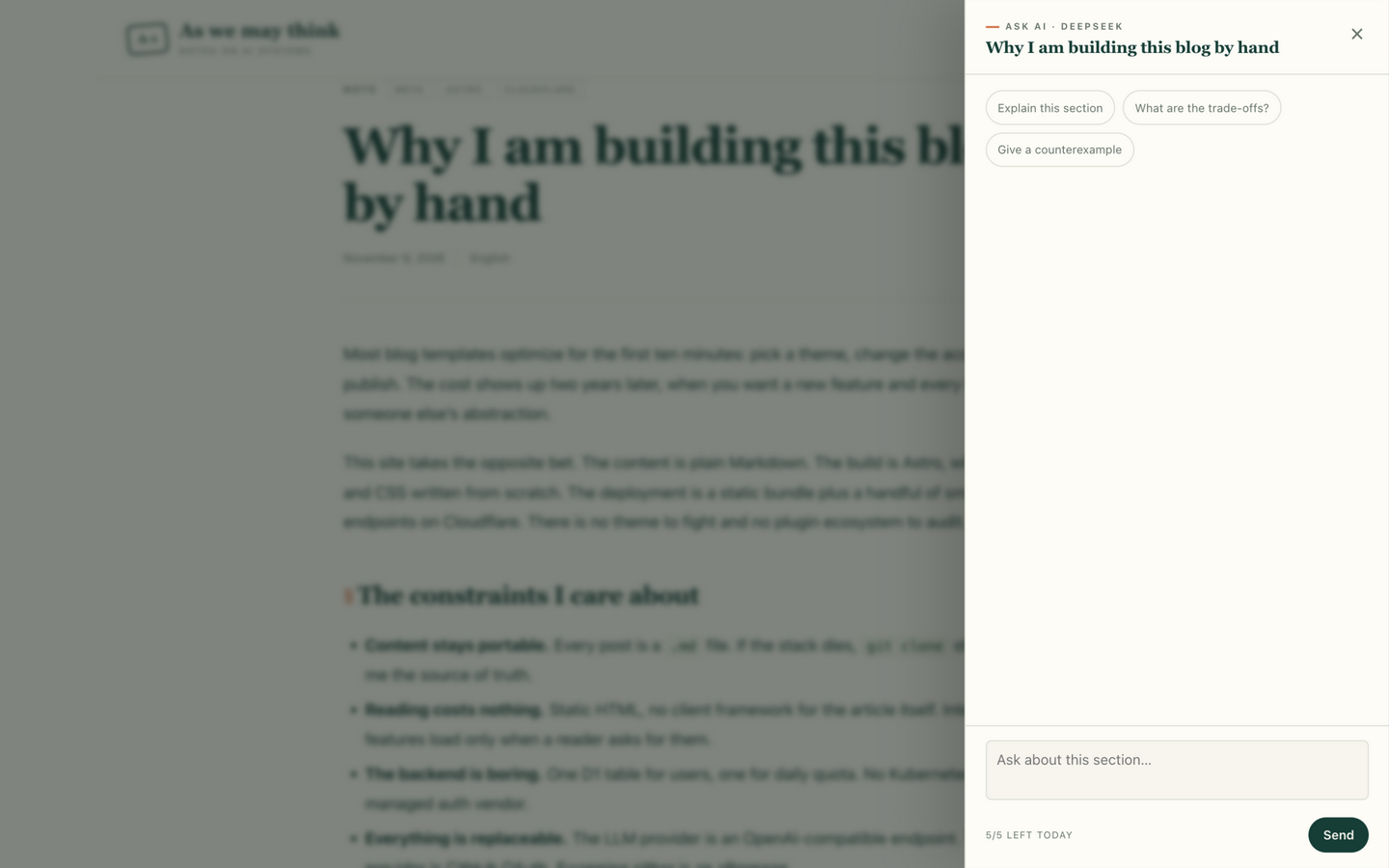
The remaining count is in the Ask AI panel, not the header. The header shows who is signed in; the number belongs next to the input. I had it in both places for a while. It looked like a warning label.
The stupid part was the registration form. I spent a while on the GitHub App page, which asks for a Webhook URL and refuses localhost because GitHub can’t reach it. OAuth Apps don’t have a webhook field. I was on the wrong page. The useful discovery was that one OAuth App can hold up to ten redirect URIs, so the same app covers localhost and production.
Ask AI, scoped to a section
I didn’t want a general chatbot. I wanted to select a paragraph, ask a question, and get an answer that used that part of the article. I started with a chat box, then realized the hard part was finding the right text.
It sounds small, but it changed three parts of the system.
The context is a section
I skipped the vector database. The article is already known from the URL, and the reader is asking about a heading or a selection. At build time, each post is split into sections:
{
  "slug": "hello-static-blog",
  "intro": "…",
  "sections": [
    {
      "anchor": "the-constraints-i-care-about",
      "level": 2,
      "heading": "The constraints I care about",
      "path": ["The constraints I care about"],
      "text": "## The constraints I care about\n\n…"
    }
  ]
}
The anchor comes from the same github-slugger that Astro uses for heading IDs. The client sends the anchor; the server finds the text. No embeddings, no chunk sizes to tune. For one article with a known structure, headings are enough.
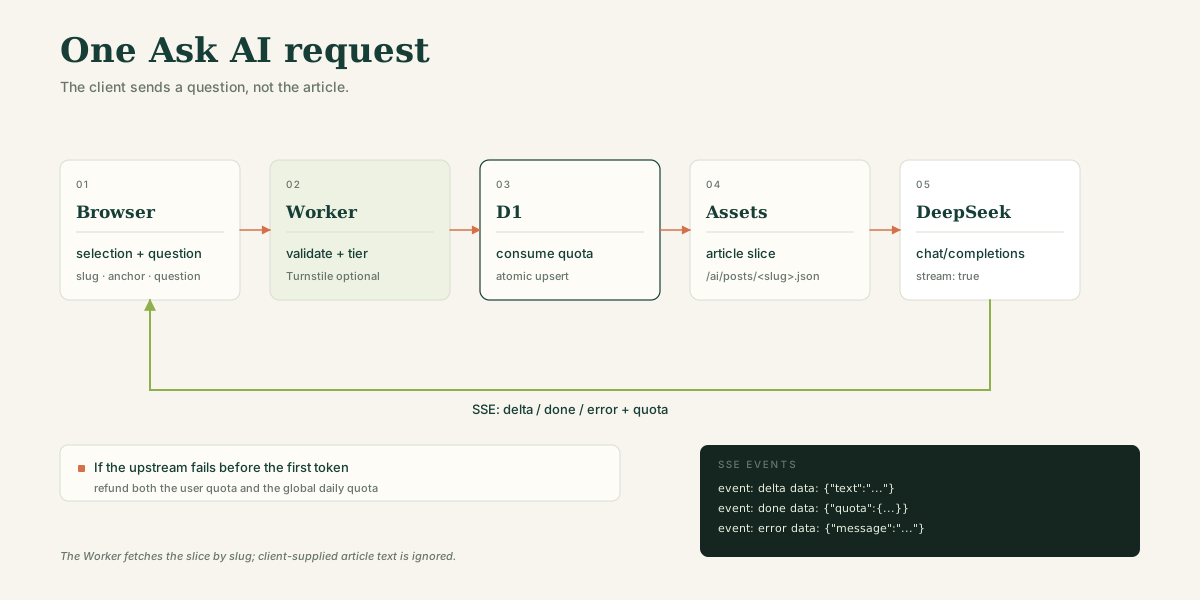
The JSON is written to /ai/posts/<slug>.json at build time and read through the static-assets binding. The client doesn’t send article text. It sends the slug, anchor, selection, question, and the last few turns. Everything else is ignored.
The prompt is built on the server
The system prompt frames the task: one article, use the provided context, and admit when the context doesn’t answer the question. I append the title, the section, and the selected text. Context is capped at 8,000 characters; question and selection at 2,000 each; output at 800 tokens.
I kept the limits small. A blog answer should be a few paragraphs, not a report, and small limits make latency and cost easier to predict.
Which DeepSeek API
DeepSeek has three surfaces: Chat Completions, a Responses-style API, and an Anthropic-compatible Messages API. I used Chat Completions.
| Surface | What it gives you | Why I didn’t choose it |
|---|---|---|
| Chat Completions | Simple OpenAI-compatible SSE, tools, vision, thinking controls | — |
| Responses | Richer item/event model, built-in web search on the pro model, Codex compatibility | More event types; stateless; no need for tools or web search here |
| Anthropic-compatible | Claude Code and Anthropic SDK compatibility | The site has no Anthropic dependency |
Portability was the main reason. Chat Completions is the narrowest thing that supports what I need: a system prompt, a short history, and a token stream. If I change providers, I change the base URL and the model name. The rest of the site doesn’t care.
One thing I got wrong: DeepSeek turns thinking on by default, with reasoning_effort set to high. My first version would have paid for reasoning on every question. The fast path now sends thinking: { type: "disabled" }. The optional smart path turns it on for established users. A one-sentence answer from the fast path used 474 prompt tokens and 73 completion tokens; the prompt includes the article context, and the completion is the answer only.
Three SSE events
The Worker doesn’t pass the provider’s stream through. It translates it:
event: delta
data: {"text":"…"}

event: done
data: {"model":"deepseek-flash","quota":{"remaining":4}}

event: error
data: {"message":"The model returned an error."}
done carries the latest quota, so the panel can update without another request. The client shows deltas as plain text, then renders the final answer with marked and sanitizes it with DOMPurify. I don’t trust HTML from a model.
Keeping the bill predictable
The endpoint is public, so the limits have to be real:
- A per-identity daily quota, keyed by GitHub user id when signed in and by IP otherwise.
- A global daily cap of 1,000 requests, stored in the same D1 table under
global:ask. - Input, history, context, and output limits.
- Optional Turnstile for anonymous requests. It’s implemented but not enabled in production yet.
- Refunds. If the upstream fails before the first token, or the article slice is missing, or an internal error occurs, the user quota and the global quota are both returned.
The quota check is an atomic INSERT … ON CONFLICT … RETURNING in D1, not a read-modify-write in KV. Two parallel requests can’t both slip under the limit.
What runs where
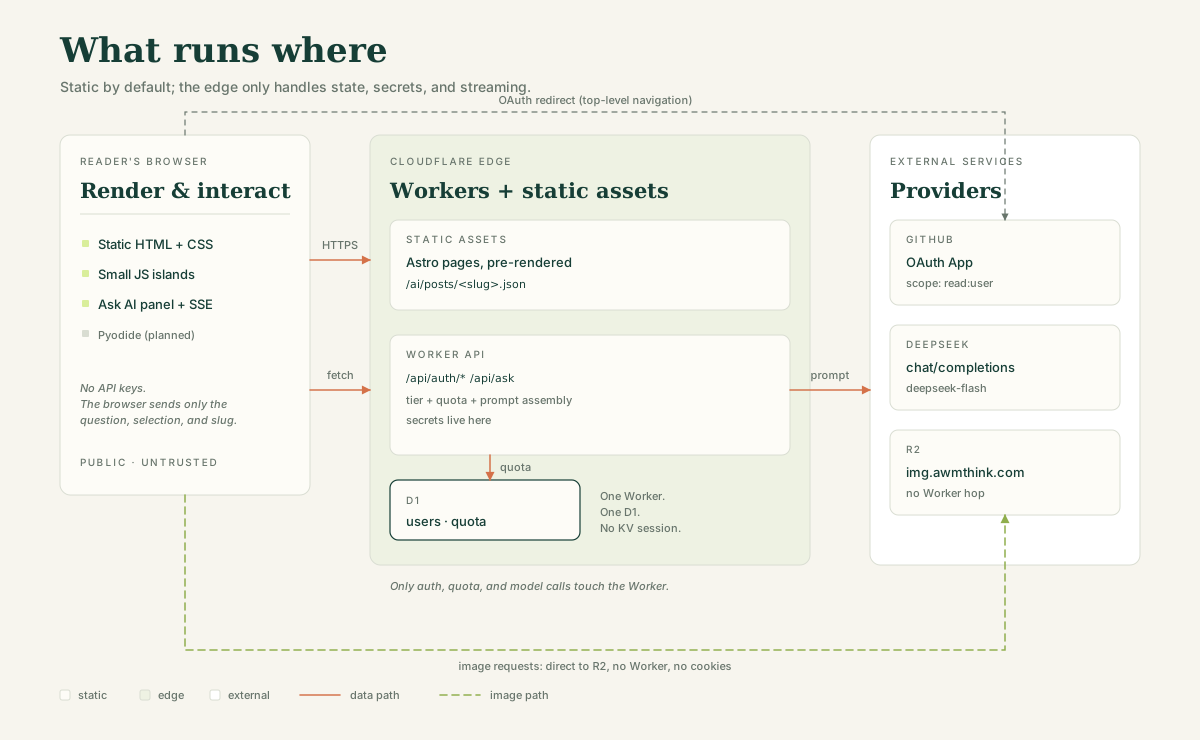
- Browser: renders static HTML, runs the small interaction islands (auth menu, Ask AI panel), and will run Pyodide code when that feature ships. It holds no API keys.
- Cloudflare edge: serves the static assets and runs one Worker. The Worker handles the OAuth callback, quota checks, article-slice lookup, prompt assembly, and the model proxy.
- D1: two tables,
usersandquota. The quota table is keyed by day and subject; rows older than a couple of days are pruned on login. - R2: images, served from
img.awmthink.com. The request never touches the Worker, carries no cookies, and is cached at the edge for a year. - Git and GitHub Actions: the source of truth. CI runs
checkandbuildon every push and deploysmainafter they pass. D1 migrations are deliberately manual; a push should not run SQL against production.
I care more about these boundaries than about the framework. Static files can be cached and forgotten. State and secrets stay in one place. Images are on their own domain and can’t take the site down. If one piece fails, the others keep working.
Code execution isn’t built yet
The next feature is running code in the page. There are three versions of it:
- Read-only run. The code is mine; the reader presses Run and sees the output. This is the common case for a technical post.
- Editable parameters. The reader changes a value and reruns the snippet.
- Arbitrary code. The reader writes code, possibly in another language, possibly for more than a few seconds.
The first two belong in the browser. Pyodide runs Python in a Web Worker, so I don’t pay for CPU and I don’t have to sandbox anything. The cost is a cold start and a package limit: numpy and pandas are fine, PyTorch isn’t.
Deterministic snippets should also run at build time. The output is stored next to the post, so the page works before the Run button is pressed.
The third version means running infrastructure again: sandboxes, network isolation, time and memory limits, a queue, a rate limiter. Piston or E2B can provide the isolation, but it’s no longer a static blog.
None of this is shipped. The Ask AI panel was enough of a proof that the interaction works, and I didn’t want a second runtime before the first one was stable. It’s designed but not built.
The design system
The first version of the site looked like an Astro starter with a green accent. It worked, but it didn’t look like anyone had made a decision.
I had a reference I liked: a Chinese license-plate atlas. I wasn’t interested in its layout. I wanted the palette and the type: warm paper, dark green ink, a serif for headings, a lime highlighter, thin rules, index numbers, and small cards with a hard shadow.
I wrote the tokens down in DESIGN.md:
- Paper, ink, muted text, and two line weights.
- Lime for keyword highlights, orange for focus and hover, never both at once.
- Georgia for display, the system sans for prose, a mono face for code.
- A 1,240px frame, a 68ch reading measure, and figures allowed to break out to 960px.
- One set of semantic tokens for light and dark mode; no component hardcodes a color.
The home page uses three index cards, one lime highlight, and a numbered list instead of a card grid. The article page adds an orange § before each H2, tinted quotes, and dark code blocks. The Ask AI panel uses the same tokens; it looks like part of the site instead of a widget.
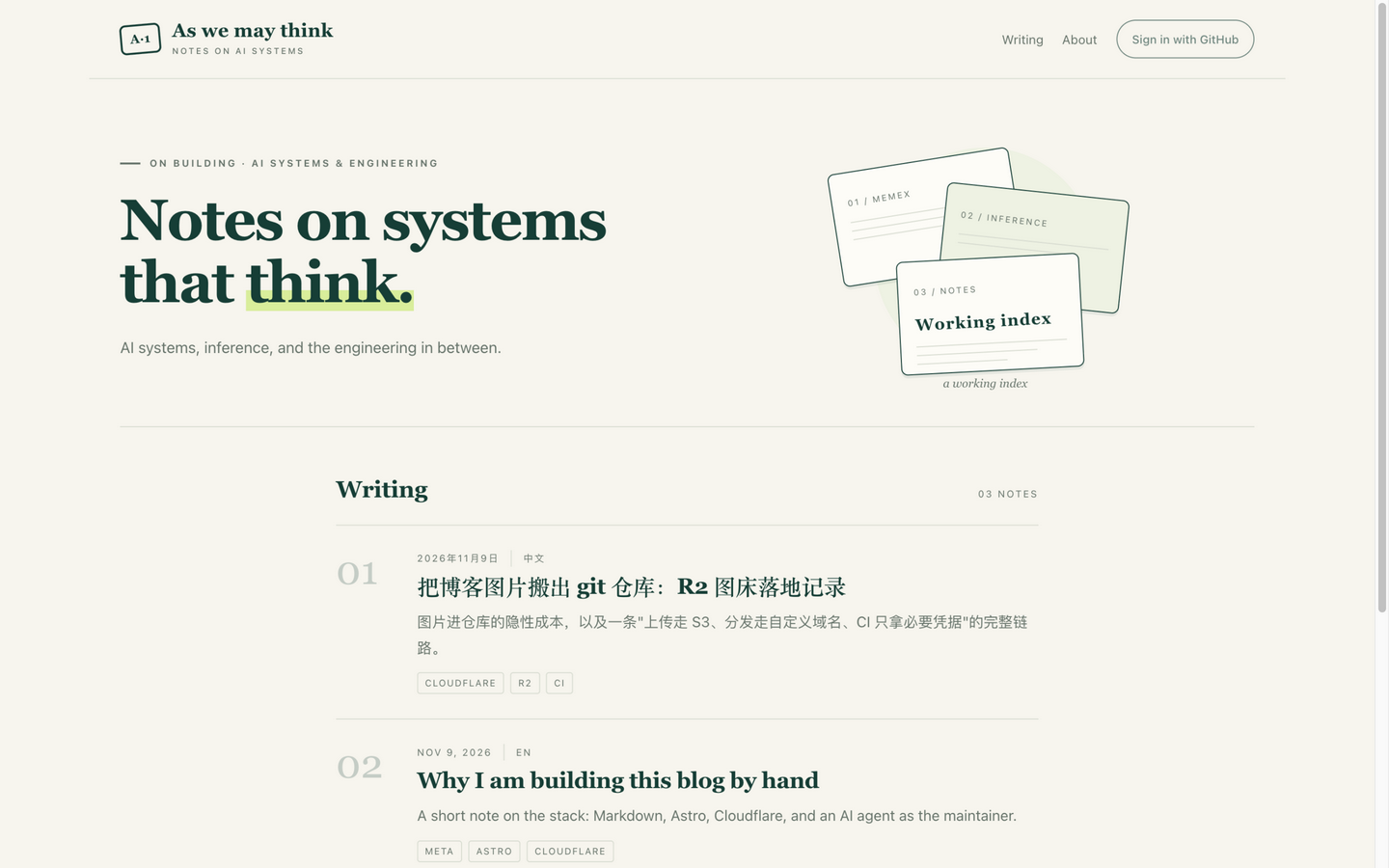
The payoff came later. When the Ask AI panel needed a header, a context chip, and suggestion buttons, the tokens already covered most of it.
Working with the agent
The agent wrote most of the code. I wrote the constraints.
AGENTS.md has the commands, the directory layout, the security rules, the database rules, and a checklist. It’s specific on purpose. “Use the design tokens” doesn’t stop a component from hardcoding a hex color. “The session cookie must be HttpOnly, SameSite=Lax, and __Host- on HTTPS” does.
The agent was good at the tedious, well-defined work: scaffolding, the OAuth callback, translating SSE, moving the site to the new design, writing docs. It was also good at finding inconsistencies because it could hold the whole repo in context.
The decisions I had to make were the boundaries:
- What runs in the browser versus the edge.
- Which secrets exist and where they are allowed to live.
- The difference between a quota that protects a wallet and a quota that punishes readers.
- What not to build yet.
The failures were more useful:
- Astro ignores
src/pages/_ai. Directories starting with an underscore are not routed. The build still succeeded, which is why it took me a while to notice. Moving the route tosrc/pages/ai/postsfixed it. - Adapter 14 removed
Astro.locals.runtime. Bindings come fromcloudflare:workers. Most examples I found were written for the old API. - The adapter enabled things I didn’t ask for. A KV session namespace and Cloudflare Images appeared in the generated config.
session: falseandimageService: 'passthrough'removed them. - Local D1 is not one database.
astro devandwrangler d1 execute --localcan resolve to different Miniflare SQLite files. The CLI migration created the tables in one file; the dev server used another and returnedno such table: quota. A dev-onlyensureDevSchema()now applies the migration on the first request that touches the database. D1.exec()is not a migration runner. It treated a multi-lineCREATE TABLEas separate lines and failed withincomplete input. Splitting the migration on semicolons and running each statement fixed it.- DeepSeek thinking is on by default. The first version would have paid for reasoning tokens on every question. The fast path now sends
thinking: { type: "disabled" }. - A deploy can look successful and serve old assets. The Worker had updated; the custom-domain mapping hadn’t. Removing and re-adding the mapping fixed it. I wrote it down so I don’t debug the wrong layer next time.
The pattern I kept running into: the agent can implement a decision quickly, but it can’t tell which decision is expensive. That part stays with me.
What it costs
| Item | Cost |
|---|---|
| Domain | About $12/year |
| Cloudflare Workers, static assets, D1 | Free tier |
| R2 storage and egress | 10 GB free, no egress fee |
| DeepSeek | Usage-based; cents to a few dollars per month |
| Total before optional VPS | About $12–20/year at this traffic |
The first deploy dry-run was 635 KiB, or 166 KiB gzipped. Article pages ship no client framework; the only JavaScript is the auth menu and the Ask AI panel, which loads when it’s opened.
I checked the things that are easy to get wrong:
npm run checkandnpm run buildpass with zero errors and zero warnings.wrangler deploy --dry-runshows only the D1 and assets bindings.- D1’s atomic
RETURNINGbehavior is tested locally. - The OAuth login redirect points at the right client id and callback URL.
- A mock model verifies streaming, quota exhaustion, and refunds.
- A real DeepSeek request verifies the current model name and the thinking parameter.
- The browser verifies the panel, the streaming Markdown, the selection popover, and the exhausted state.
I haven’t verified Turnstile in production, code execution, or a mainland mirror. Those are still open.
What I’d do differently
I built the features before I had three posts worth publishing. That was backwards. The first ten hours should have gone into writing, because writing is what shows whether the typography, the code blocks, the image workflow, and the navigation actually work.
I’d add RSS, a sitemap, and Open Graph images earlier. They’re small, and every post published before them misses a distribution channel.
The design system should have come before the first feature. It’s cheap to make a token set and expensive to retrofit one; the first Ask AI panel looked like a different product until it was reskinned.
Next: Pyodide for selected snippets, RSS and a sitemap, Turnstile on by default for anonymous users, comments and search, and a mainland mirror only if the traffic justifies it.
I have a larger project in mind: pulling ten years of notes out of GitHub, note apps, and Feishu into one searchable system. That’s a separate article. This one is about the build.
The site is named after Vannevar Bush’s 1945 essay, As We May Think. I liked the idea of a personal store of knowledge with trails between documents. A blog is a simple version of that, and Markdown files will still open in ten years. I can’t say the same for the Worker.
The code was the easy part. Deciding what to leave out took longer.
Comments
Comments are public and signed with your GitHub account.
No comments yet.