Moving blog images out of git: landing an R2 image host
This blog runs on Cloudflare Workers. Posts are Markdown; deploying is a push to main that lets CI run wrangler deploy. One thing stayed undecided for a while: where do images live?
The most common approach is committing images alongside the posts (public/assets/<slug>/). It works, but the hidden costs add up:
- Repo size only grows. However well you compress, a few dozen posts accumulate tens or hundreds of MB. Clones get slower, and old images in git history can never be removed.
- Images and text share one release cadence. Want to upload an image, see how it looks, then edit the text? It all has to go in one commit.
- Cache headers aren’t yours. When a Worker serves static files, the caching policy is either site-wide or a special case you code by hand.
So this time images moved to R2 — Cloudflare’s object storage. The free tier gives 10 GB of storage and charges no egress for delivery over a custom domain, which is far more than a personal blog needs.
Architecture: two lines that don’t touch
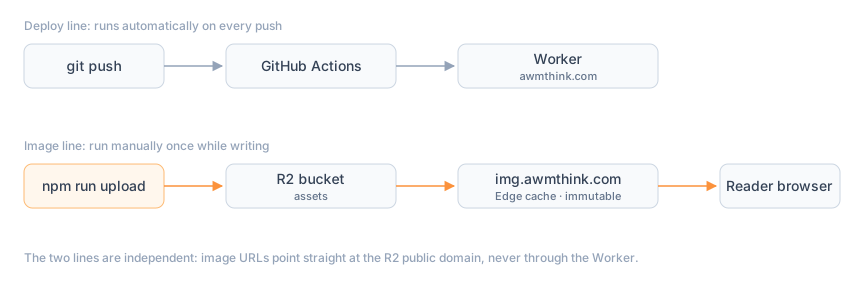
The key trade-off is fully decoupling the two lines:
- The deploy line handles code and text only, and runs automatically on every push.
- The image line runs once, manually, while writing: upload, paste the URL into Markdown, and never touch it again.
Image URLs point straight at R2’s public custom domain img.awmthink.com and never pass through the Worker. Image requests cost zero Worker invocations, carry zero cookies, and hit Cloudflare’s edge cache directly.
Setting up the path
R2 needs to be enabled once in the dashboard (attach a payment method to activate the free tier); after that, buckets and uploads work from the CLI:
# Create the bucket
npx wrangler r2 bucket create assets

# Bind the custom domain img.awmthink.com to the bucket in the dashboard;
# Cloudflare provisions the CNAME and the certificate, live within minutes
On this machine, npx wrangler login did a one-time OAuth authorization. After that, uploads need no long-lived credentials at all.
The upload script
Uploading is the high-frequency action, so it got a small zero-dependency script. The core is one call to wrangler r2 object put:
const key = `${slug}/${basename(file)}`;
const result = spawnSync('npx', [
  'wrangler', 'r2', 'object', 'put', `assets/${key}`,
  '--file', file,
  '--content-type', MIME[ext],
  // Image URLs live in Markdown permanently, so cache for a year on the
  // assumption that content never changes; to change an image, change the
  // filename — re-uploading under the same name won't refresh the edge cache
  '--cache-control', 'public, max-age=31536000, immutable',
  '--remote',
], { stdio: 'inherit' });
Adding an image to a post is then:
npm run upload ~/Desktop/cover.webp blog-images-on-r2
# ✅ https://img.awmthink.com/blog-images-on-r2/cover.webp
The script adds two gates along the way: an extension whitelist and a 2 MB size cap — turning “compress before committing” from an after-the-fact convention into an upfront enforcement.
CI deploys never touch R2
CI (GitHub Actions) needs exactly two secrets: CLOUDFLARE_API_TOKEN and CLOUDFLARE_ACCOUNT_ID. The deploy job sits after check and runs only on pushes to main:
deploy:
  needs: check
  if: github.event_name == 'push' && github.ref == 'refs/heads/main'
  runs-on: ubuntu-latest
  steps:
    - uses: actions/checkout@v5
    - uses: actions/setup-node@v5
      with: { node-version: '22', cache: npm }
    - run: npm ci
    - run: npm run deploy
      env:
        CLOUDFLARE_API_TOKEN: ${{ secrets.CLOUDFLARE_API_TOKEN }}
        CLOUDFLARE_ACCOUNT_ID: ${{ secrets.CLOUDFLARE_ACCOUNT_ID }}
R2 credentials stay out of CI: the build never touches images, and the deploy needs no R2 permissions. The principle is simple — CI gets only the credentials it actually uses; every unused variable just widens the leak surface.
The trap: account tokens don’t verify on user endpoints
This was the longest detour of the whole exercise. Background: Cloudflare now has two kinds of API tokens — user tokens (prefixed cfut_, tied to a person) and account tokens (prefixed cfat_, tied to an account; the recommended kind for automation).
My token was a cfat_ account token, but I verified it against the user-token endpoint:
# ✗ The user endpoint: always returns Invalid API Token for account tokens
curl .../user/tokens/verify -H "Authorization: Bearer cfat_xxx"

# ✓ Account tokens verify on the account endpoint
curl .../accounts/<account_id>/tokens/verify -H "Authorization: Bearer cfat_xxx"
The result: a perfectly valid token that I misread as invalid, rebuilt and rolled back several times over. The lesson is that the verification tool and the thing being verified must belong to the same system — an “invalid” from the wrong endpoint isn’t evidence, it’s a non-answer.
Summary
- Images in R2, text only in the repo: clone size and caching policy both stay clean
- One command to upload (local OAuth, zero long-lived credentials), delivered via
img.awmthink.com(zero Worker invocations) - CI and R2 fully decoupled, secrets kept to a minimum
- To change an image, always change the filename; the old immutable cache takes care of itself
Comments
Comments are public and signed with your GitHub account.
No comments yet.